Building an LSM Storage Engine from Scratch in Go, Part 3
Part 2 allowed us to have durable writes and slightly more efficient reads (owing to bloom filters), but SSTables keep accumulating on disk.
The Accumulation Problem
At 10K write QPS with a 500MB memtable and ~4KB entry size, we flush roughly every 12 seconds. That’s about 300 SSTables per hour, and each one the read path has to consider. Bloom filters help skip irrelevant files, but the number of files to check still grows without bound.
That’s where compaction comes in: it merges multiple SSTables into fewer, larger ones, discarding duplicate keys and old tombstones along the way.
Leveled Compaction
There are two common approaches to compaction: size-tiered and leveled. Size-tiered (Cassandra’s default) groups SSTables of similar size and merges them when enough accumulate in a tier. It’s simple and write-friendly, but read amplification is high because files at different tiers can have overlapping key ranges.
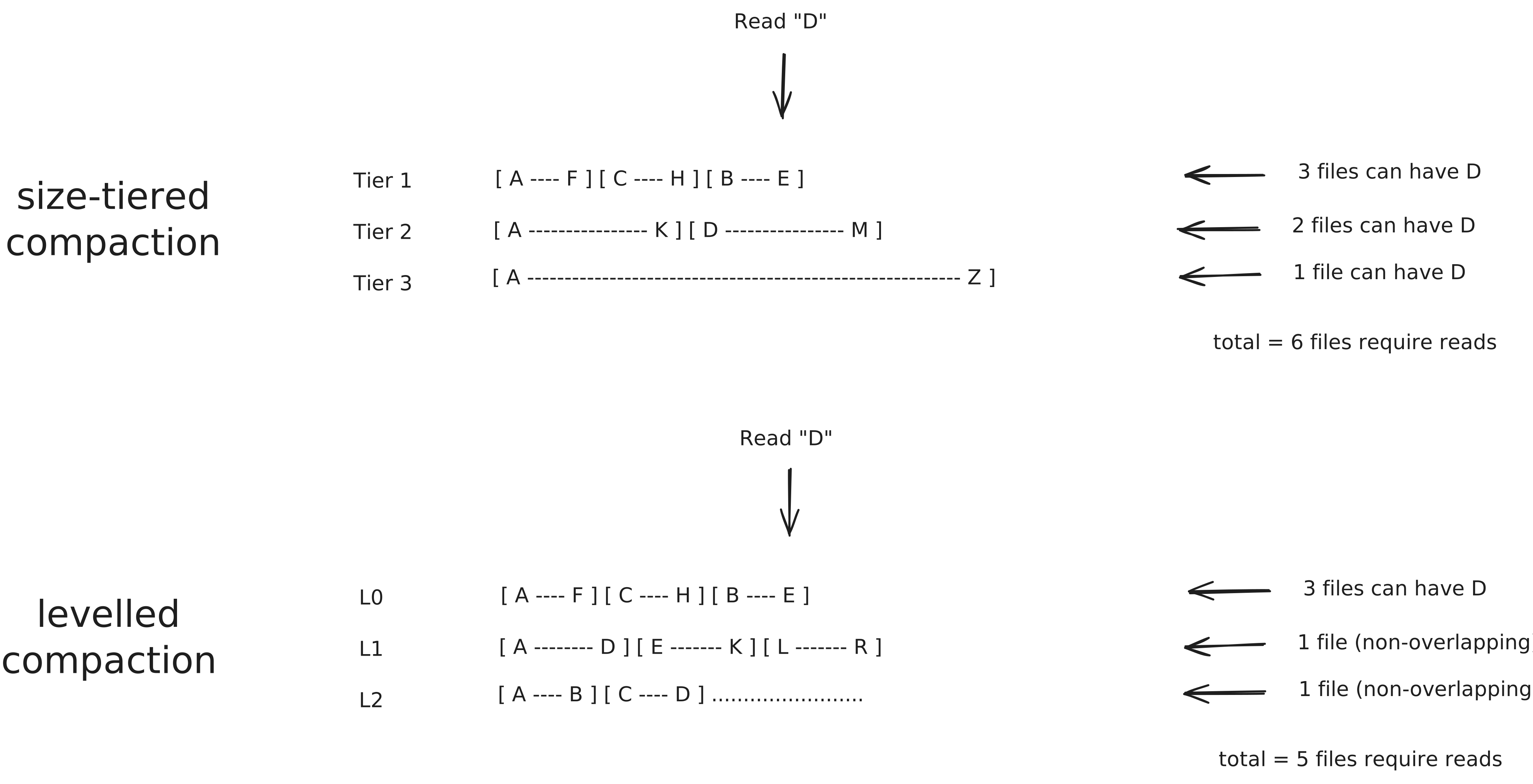
I went with leveled compaction (what RocksDB and LevelDB use). SSTables live at explicit levels (L0 through L3 in our case). L0 holds direct flushes and its files can have overlapping key ranges. L1 and above enforce non-overlapping key ranges within each level. When a level exceeds its capacity, we pick SSTables from it, find overlapping files in the next level, merge-sort them together, and write the result to the next level.
The capacity thresholds we use are 4 SSTables for L0, 10 for L1, 100 for L2, and 1000 for L3.
The tradeoff is that leveled compaction has higher write amplification (merging into the next level can touch multiple files), but that work happens in the background during compaction and doesn’t affect reads directly (compaction can still compete for disk bandwidth under heavy load; a second-order concern we’ll set aside for now). Read amplification stays low and bounded since for L1 and above, the non-overlapping invariant means we check at most one file per level for a point read.
How It Works
A background goroutine runs on a 60-second ticker. When it fires, we walk through each level starting from L0:
- If the level exceeds its capacity, pick each SSTable in that level
- Find all SSTables in the next level with overlapping key ranges
- Merge-sort the entries (newest version of each key wins)
- Write the merged result to the next level
- Delete the old SSTables from both levels
At L3 (the final level), tombstones are dropped since there are no deeper levels where an older version could hide. If merging L0 into L1 pushes L1 over its threshold, the next ticker cycle triggers L1 into L2, and so on, so compaction cascades through the levels on its own.
Dropping the Manifest
In Part 1, we introduced a manifest file to track which SSTables exist on disk, their key ranges, and sequence numbers. Each flush appended a line to this file, and on startup we read it to reconstruct state.
This worked fine for flushes, but compaction made it fragile. During compaction, new SSTables are created and old ones are deleted. If the process crashes between writing the new files and updating the manifest, we end up with either orphaned SSTables (on disk but not in the manifest) or stale manifest entries (pointing to deleted files). Handling every crash scenario correctly is surprisingly involved (RocksDB dedicates significant complexity to this).
I took a simpler approach inspired by Cassandra: make the filesystem the source of truth. SSTables live in per-level directories (L0/, L1/, L2/, L3/). On startup, we scan each directory to discover what exists. The manifest file is no longer needed for SSTable discovery, though it meant reworking how we track SSTables on startup.
Orphaned files from crashed compactions are automatically picked up in the next compaction run. There’s no manifest to corrupt, and with our level thresholds the max SSTable count is about 1,114 files (scanning that many on startup is negligible).
The SSTable Directory Layout
We still need a way to detect incomplete SSTables from crashed writes and load metadata without scanning the entire data file. Each SSTable is now a directory containing three files:
sstables/L0/sstable_000001/
  .bloom  -- bloom filter bitmap (8KB)
  .data   -- sorted KV entries in binary format
  .stats  -- min/max keys, size, sequence number
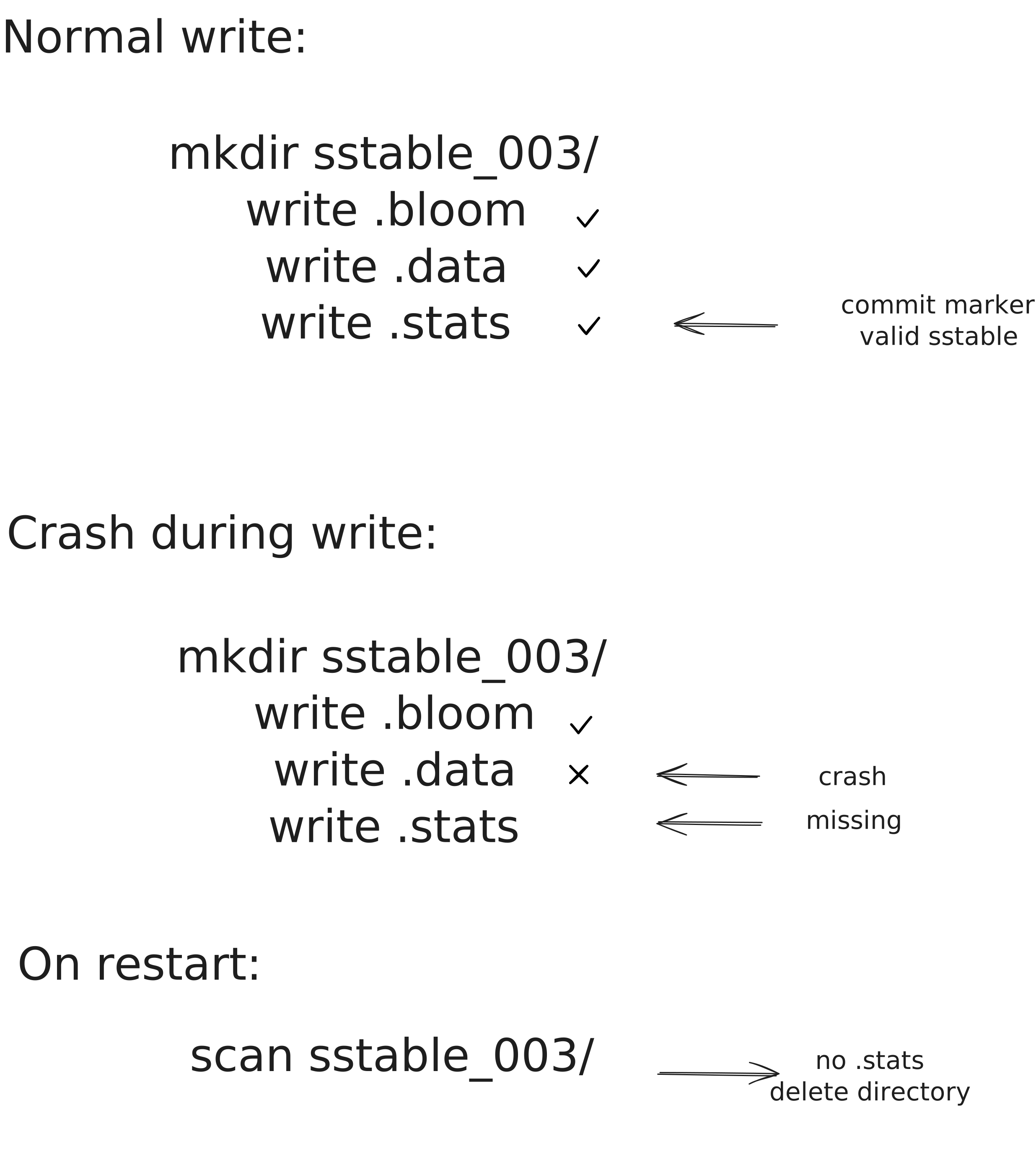
An alternative is to pack everything into a single file (data first, metadata appended at the end). I explored this but separate files let us load metadata without opening the data file, and the write order (.bloom, .data, .stats) gives us a natural commit marker — if .stats is missing, the SSTable is incomplete.
We write .bloom first, then .data, then .stats last (each followed by an fsync). On startup, if a directory has no .stats file, we know the write didn’t complete and delete the directory.
Loading on Startup
On startup, we scan each level directory and for each SSTable folder:
- Check for
.stats. If missing, delete the entire folder (incomplete write) - Parse
.statsto extract min/max keys, size, and sequence number - Load
.bloominto memory for the bloom filter - Sort SSTables by sequence number (newest first)
After loading from disk, we run WAL recovery to replay any entries that didn’t make it to an SSTable before the last crash.
func NewLSM(rootPath string) (*LSM, error) {
    // ... init WAL, create level directories ...
    nextSeq := loadSSTablesFromDisk()  // scan folders
    RecoverExistingWALs()              // replay WALs into L0
    // ... start compaction ticker ...
}
The sequence number for the next SSTable is derived from the highest sequence found on disk plus one. No manifest needed to track this since the filenames themselves encode it (sstable_000001, sstable_000002, …).
What Happens on Crash
Compaction touches multiple files across multiple levels, so crashes can happen at any point. The ordering of operations matters:
- Write new merged SSTables to the target level (with
.statscommit marker) - Delete old SSTables from the source level
- Delete old SSTables from the target level that were merged
If we crash after step 1 but before the deletes, the next restart sees duplicate data across levels (same keys in both the old and new SSTables). Reads are still correct since the values are identical, and the next compaction run merges the duplicates.
If we crash during step 1 (before .stats is written), the incomplete SSTable is cleaned up on startup, and the old SSTables are still intact.
It’s the same pattern as WAL recovery: transform data into a new durable artifact, then delete the old one. If the crash happens before the new artifact is committed, the old data is still there. If it happens after, the worst case is duplicates that the next compaction resolves.
Where We Are
The storage engine now handles its own cleanup:
- Compaction: Leveled compaction merges SSTables across L0 through L3, keeping read amplification bounded (at most one file checked per level for L1+).
- Recovery: Folder scanning replaces the manifest file. The filesystem is the source of truth, and
.statsserves as the commit marker for each SSTable. - Crash safety: The write ordering (new files first, deletes after) ensures no data loss at any crash point.
Part 4 covers benchmarking the engine under load.
Enjoy Reading This Article?
Here are some more articles you might like to read next: